



What is RAG (Retrieval-Augmented Generation)? A Practical Guide with a Customer Service Example (with Code)
If you've been working with LLMs, you've probably realized something quickly: they're powerful—but they don't know your business. That's where RAG (Retrieval-Augmented Generation) comes in.
What is RAG (in simple terms)?
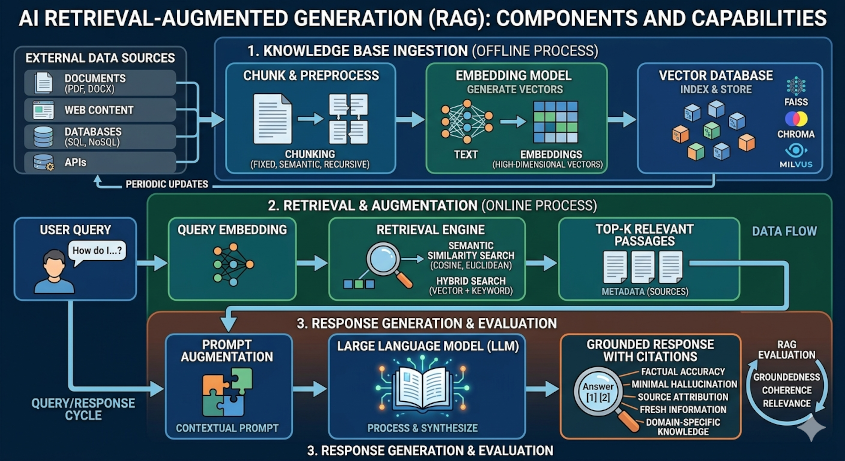
RAG is a pattern where an LLM:
- Retrieves relevant data from your own sources (SQL, documents, APIs)
- Augments the prompt with that data
- Generates a response grounded in reality
In short: RAG = LLM + your database + context injection
Why RAG matters
With RAG:
- Answers are accurate and contextual
- You can query live systems (like SQL databases)
- You unlock real business workflows
Tools used in this implementation
- LangChain
- Hugging Face Transformers
- SQL database (customer + usage data)

Use Case: AI Customer Service Agent (with SQL + Actions)
User says: "I want to cancel my plan. It's too expensive."
We will:
1
Query customer + usage data (SQL)
2
Calculate LTV
3
Decide on discount
4
Apply discount
5
Send email
6
Log for reporting
Implementation (Step-by-Step Code)
1
Install dependencies
# Run this on the command line
pip install langchain transformers torch sqlalchemy
2
Setup Hugging Face LLM
from transformers import pipeline
from langchain.llms import HuggingFacePipeline

pipe = pipeline(
    "text-generation",
    model="google/flan-t5-base",
    max_length=256
)
llm = HuggingFacePipeline(pipeline=pipe)
3
Connect to SQL Database
from sqlalchemy import create_engine, text

engine = create_engine("sqlite:///customer.db")

def query_db(query, params={}):
    with engine.connect() as conn:
        result = conn.execute(text(query), params)
        return [dict(row._mapping) for row in result]
4
Retrieval Functions (RAG layer)
def get_customer(customer_id):
    query = """
        SELECT customer_id, email, plan_type,
               monthly_fee, tenure_months
        FROM customers
        WHERE customer_id = :id
    """
    return query_db(query, {"id": customer_id})[0]

def get_usage(customer_id):
    query = """
        SELECT product_name, usage_last_30_days
        FROM usage
        WHERE customer_id = :id
    """
    return query_db(query, {"id": customer_id})
1
Business Logic: LTV Calculation
def calculate_ltv(customer):
    return customer["monthly_fee"] * customer["tenure_months"]
2
Decision Node (LLM-powered)
from langchain.prompts import PromptTemplate

decision_prompt = PromptTemplate(
    input_variables=["ltv", "plan", "usage"],
    template="""
Customer LTV: {ltv}
Plan: {plan}
Usage: {usage}

The customer wants to cancel due to price.
Should we offer a discount?
Answer YES or NO and explain briefly.
"""
)

def should_offer_discount(ltv, plan, usage):
    prompt = decision_prompt.format(
        ltv=ltv, plan=plan, usage=usage
    )
    response = llm(prompt)
    return "YES" in response.upper(), response
3
Apply Discount (SQL)
def apply_discount(customer_id, discount):
    query = """
        UPDATE customers
        SET discount_percentage = :discount
        WHERE customer_id = :id
    """
    query_db(query, {"discount": discount, "id": customer_id})
4
Send Email Node
def send_email(to, subject, body):
    # Mock function (replace with SMTP or service like SendGrid)
    print(f"Sending email to {to}")
    print(subject)
    print(body)
1
Logging for KPIs / Dashboards
def log_retention(customer_id, complaint, discount):
    query = """
        INSERT INTO customer_retention_log (
            customer_id, complaint_type,
            discount_offered, timestamp
        ) VALUES (
            :id, :complaint, :discount, CURRENT_TIMESTAMP
        )
    """
    query_db(query, {
        "id": customer_id,
        "complaint": complaint,
        "discount": discount
    })
2
Full RAG Workflow
def handle_cancellation(customer_id):
    # Step 1: Retrieve data
    customer = get_customer(customer_id)
    usage = get_usage(customer_id)

    # Step 2: Calculate LTV
    ltv = calculate_ltv(customer)

    # Step 3: LLM decision
    decision, explanation = should_offer_discount(
        ltv, customer["plan_type"], usage
    )

    if decision:
        discount = 20
        # Step 4: Apply discount
        apply_discount(customer_id, discount)
        # Step 5: Send email
        send_email(
            customer["email"],
            "We value you",
            f"We've applied a {discount}% discount to your plan."
        )
        # Step 6: Log event
        log_retention(customer_id, "price", discount)
        return {
            "status": "discount_offered",
            "discount": discount,
            "llm_reasoning": explanation
        }
    else:
        # Log without discount
        log_retention(customer_id, "price", 0)
        return {
            "status": "no_discount",
            "llm_reasoning": explanation
        }
What’s happening here? (RAG in practice)
- Retrieval: SQL queries (customer + usage)
- Augmentation: Inject data into prompt
- Generation: LLM decides action
- Action Layer: SQL updates + email + logging
Final Thoughts
This is where RAG becomes powerful:
- Not just answering questions
- But executing business workflows
You now have:
- A customer retention AI agent
- Powered by real data
- Making revenue-impacting decisions
If you want to go next-level, the natural evolution is:
- Add memory (conversation history)
- Use agents/tools instead of fixed flow
- Move this into a stateful graph (LangGraph)
That’s when this stops being a script… and becomes a real AI product.